Discord File Upload Limit in 2026: It's 10 MB, Not 25
Search "Discord file upload limit" and half the results say 25 MB. That hasn't been true since September 2024. Discord quietly cut the free upload limit to 10 MB, and most of the internet hasn't caught up.
If you just tried to share a game clip or a phone video and got hit with "Your files are too powerful!", here's what's actually going on.
What's the actual Discord file upload limit?
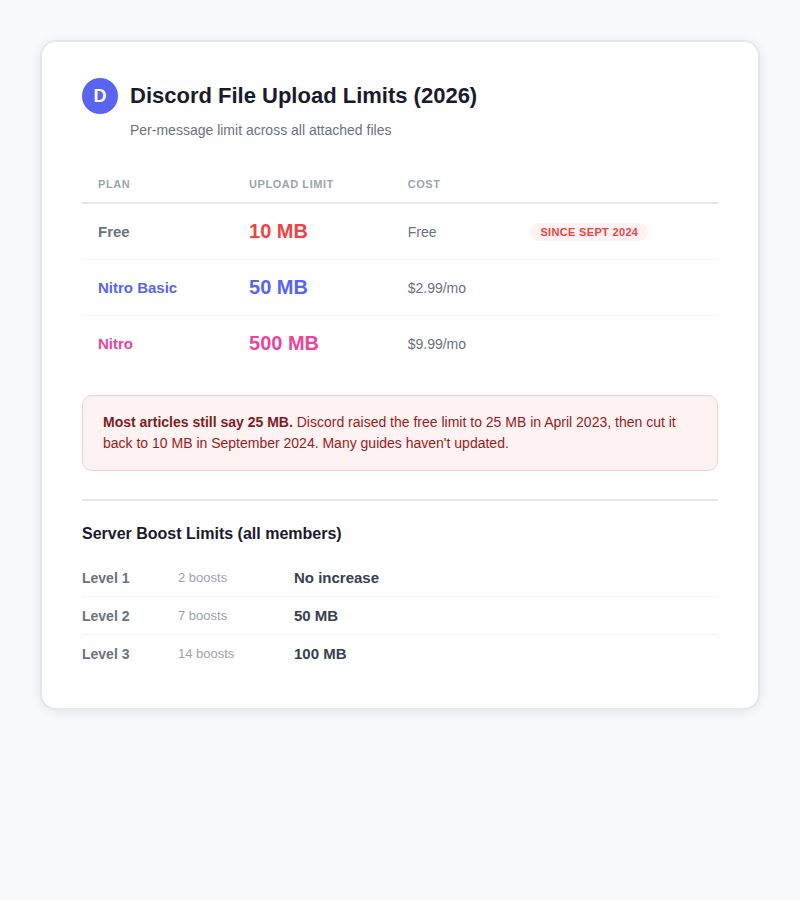
The limit applies to the total size of all files in a single message, not per file. You can attach up to 10 files per message, but they all have to fit within your limit combined. A free user sending three 4 MB files is already at 12 MB and over the cap.
It doesn't matter whether you're on the desktop app, mobile, or web browser. Same limit everywhere, same across DMs, text channels, threads, and forums.
Why did Discord drop the limit from 25 MB to 10 MB?
Discord has changed this number three times:
- Before April 2023: 8 MB for free users
- April 2023: Raised to 25 MB (briefly generous)
- September 2024: Cut back to 10 MB (current)
Their official explanation: "storage management is expensive" and "99% of users stick to files smaller than 10 MB." Discord stores uploaded files on their CDN permanently, as long as the message exists. That costs money.
But the timing says something else too. This happened right as Discord was pushing Nitro subscriptions harder. The cheapest way past 10 MB is $2.99/month for Nitro Basic, which bumps the limit to 50 MB. The full Nitro at $9.99/month gets you 500 MB.
What files are bigger than 10 MB?
Short answer: almost everything except photos and tiny GIFs.
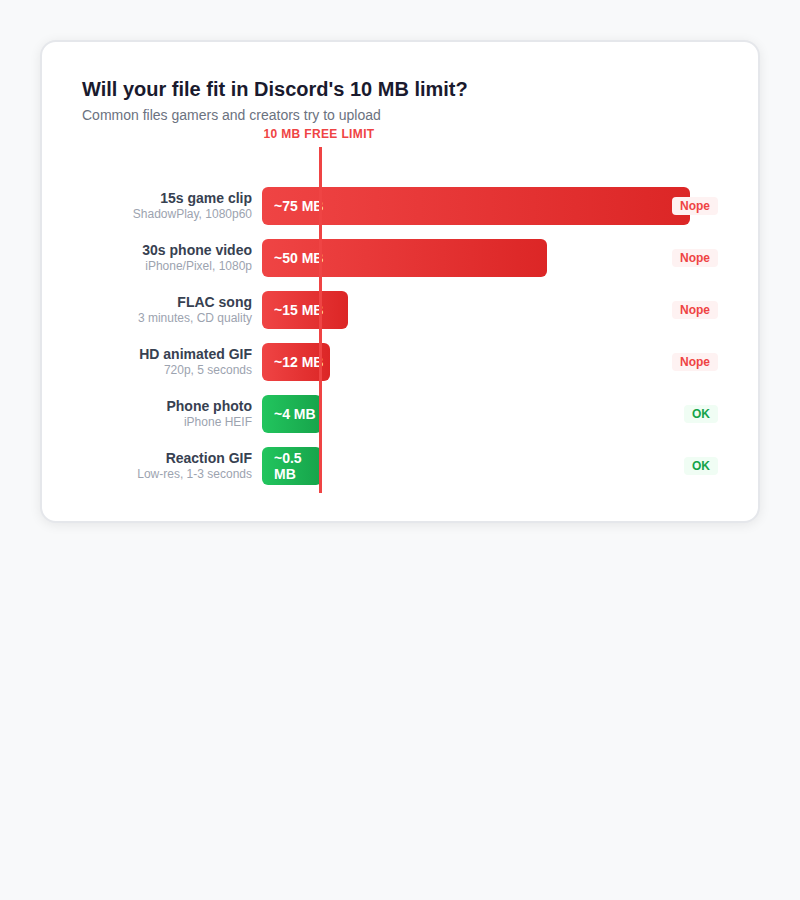
A 15-second ShadowPlay clip at 1080p60 runs around 75 MB. That's 7.5 times over the free limit. Even a 30-second video from your phone easily hits 50 MB. If you're sharing audio, a 3-minute song in FLAC is about 15 MB. High-quality GIFs at 720p hit 12 MB or more.
The things that actually fit: regular phone photos (3 to 5 MB), small reaction GIFs (under 1 MB), and short MP3 clips. Anything involving video, lossless audio, or high-res images is going to bounce.
How does Discord's limit compare to other platforms?
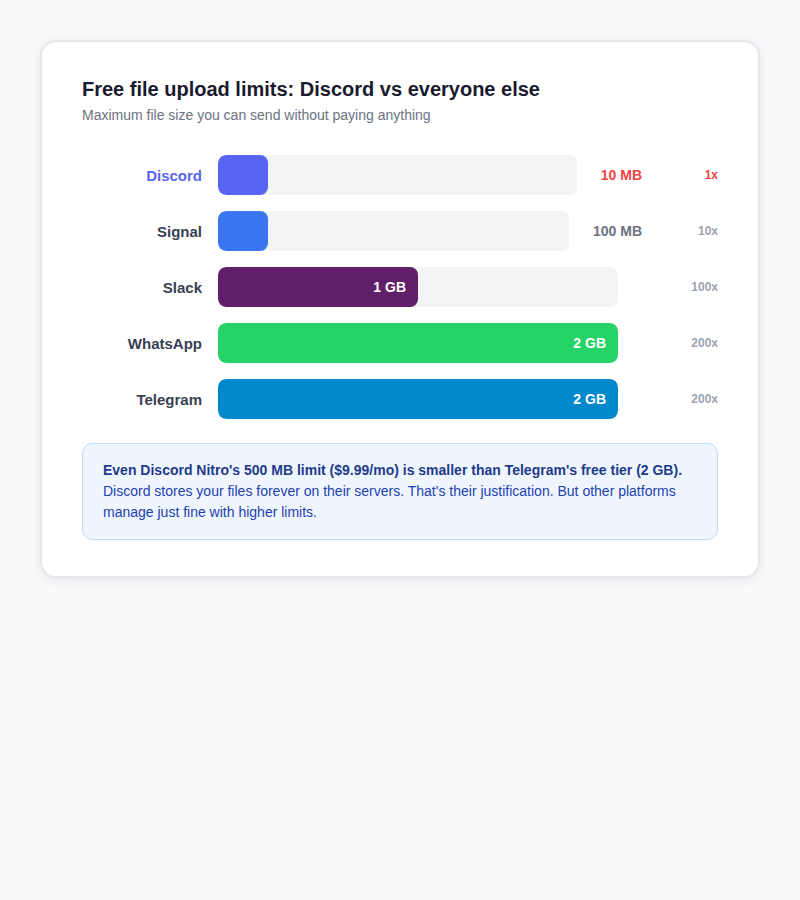
Discord's 10 MB free limit is the lowest of any major chat platform. Telegram gives you 2 GB for free. That's 200 times more. WhatsApp matches Telegram. Even Slack, which is built for work, lets you upload files up to 1 GB.
Discord's argument is that they store files forever, while platforms like Telegram compress content and WhatsApp doesn't keep files on their servers long-term. That's fair. But even Discord Nitro at $9.99/month caps out at 500 MB, which is still less than Telegram's free tier.
How to send large files on Discord without Nitro
Compress the video
HandBrake (free, open source) actually has built-in Discord presets as of version 1.5. There's a "Discord Small" preset that targets 10 MB for 2-minute clips at 360p30. Works if you're slightly over the limit. For anything bigger, the quality loss is brutal.
If you know your way around the command line, FFmpeg can do the same thing: ffmpeg -i input.mp4 -vcodec libx264 -crf 28 -vf scale=720:-2 output.mp4. CRF 28 is aggressive but keeps things small.
Online compressors like VEED and Clideo work too, but you're uploading your file to a stranger's server to get it compressed. Think about whether that matters to you.
Upload somewhere else and paste the link
This is the simplest approach and doesn't destroy your video quality. Upload the file to a sharing service, copy the link, paste it in Discord.
- sto.care handles files up to 5 GB. No account needed. Upload, get a link, paste it in chat. Files auto-delete after 7 days. Full disclosure: we built it.
- Streamable is popular for short gaming clips because videos embed with an inline player right in Discord. Free tier: 250 MB, 10-minute max, files expire after 90 days (24 hours without an account).
- Catbox.moe is big in Discord and anime communities. 200 MB limit, files stick around permanently. Their sister service Litterbox does temporary uploads up to 1 GB.
- Google Drive gives you 15 GB of free storage, but links don't embed in Discord. You just get a plain URL. Fine for documents, awkward for videos.
For more options, check out our guide to sending large files for free.
Split the file
7-Zip and WinRAR can split files into chunks of 9 MB each. Works for things like code archives, documents, or project files. Totally impractical for video because the recipient can't preview partial files. They have to download all parts and reassemble.
Use a Discord bot
NoUSB.co offers peer-to-peer file sharing through a Discord bot. No files get stored on a third-party server. There's also a BetterDiscord plugin called SplitLargeFiles that automatically chunks and reassembles. Two caveats: Discord bots themselves have an 8 MB API upload limit (even lower than users), and BetterDiscord technically violates Discord's Terms of Service.
Is Discord Nitro worth it just for bigger uploads?
Quick math. Nitro Basic is $2.99/month, or $36 per year, and gets you 50 MB uploads. Full Nitro is $9.99/month, or $120 per year, for 500 MB.
If bigger uploads are your only reason for subscribing, that's a hard sell when free alternatives exist. You could upload to sto.care, Streamable, or Catbox and save that money.
But Nitro comes with other stuff: custom emoji across all servers, HD video streaming up to 4K, two free server boosts, animated avatars, longer messages (4,000 characters instead of 2,000), and early access to new features. If you use those perks, the upload limit is a nice bonus on top. If you don't, you're paying a lot just to send bigger files.
Frequently asked questions
What is the Discord file upload limit?
10 MB for free users, 50 MB for Nitro Basic ($2.99/month), and 500 MB for full Nitro ($9.99/month). The free limit was reduced from 25 MB to 10 MB in September 2024.
Why did Discord lower the file upload limit?
Discord says storage costs are high because they keep files on their CDN indefinitely. They also claimed 99% of users upload files under 10 MB. The change happened in September 2024, shortly after Discord increased its push for Nitro subscriptions.
How do I send files larger than 10 MB on Discord?
Compress the file, upload it to a sharing service and paste the link in chat, split it into smaller parts, or upgrade to Nitro. For most people, uploading somewhere else and sharing the link is the easiest approach.
Does Discord Nitro increase the file size limit?
Yes. Nitro Basic raises it to 50 MB per message. Full Nitro raises it to 500 MB.
Can I send large videos on Discord for free?
Not by uploading directly. Even a 15-second game clip at 1080p is around 75 MB. You can compress it (quality suffers) or upload it to a service like sto.care, Streamable, or Catbox and share the link.
What happens when you hit Discord's file size limit?
Discord shows "Your files are too powerful!" and suggests upgrading to Nitro. There's no built-in workaround. Unlike Gmail, which redirects to Google Drive, Discord just blocks the upload.
Do server boosts increase the file upload limit?
Level 2 (7 boosts) raises the limit to 50 MB for all members. Level 3 (14 boosts) raises it to 100 MB. Level 1 doesn't change the file limit. Your personal Nitro limit still applies if it's higher.
How does Discord's file limit compare to Telegram?
Discord's free limit is 10 MB. Telegram's free limit is 2 GB. That's 200 times more capacity without paying anything.