Gmail Attachment Limit in 2026: Why Your 20 MB File Won't Send
You recorded a short video on your phone. Maybe 15 seconds. You try to email it through Gmail and get told the file is too large.
Gmail says the limit is 25 MB. Your video is 20 MB. So why won't it send?
Turns out, the number Google advertises isn't the number you actually get. There's a hidden step that makes your file bigger before it leaves your inbox. We'll explain exactly what's happening and what you can do about it.
What is the Gmail attachment size limit?
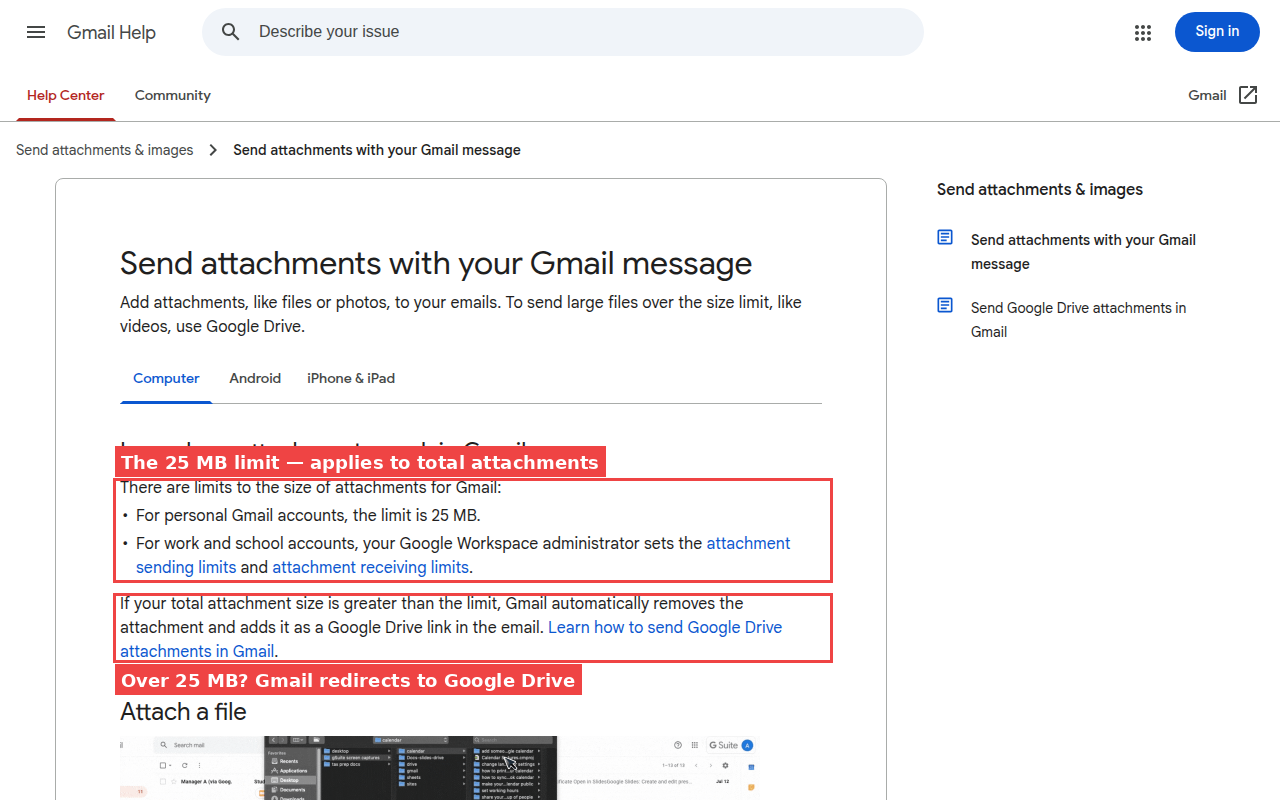
| Gmail plan | You can send | You can receive |
|---|---|---|
| Free Gmail | 25 MB | 50 MB |
| Google Workspace (most plans) | 25 MB | 50 MB |
| Workspace Enterprise Plus (new in 2026) | 50 MB | 70 MB |
One important detail: the 25 MB limit is for everything you attach combined, not per file. If you attach three photos at 10 MB each, that's 30 MB total. Over the limit.
It doesn't matter if you're on your phone, your laptop, or using Chrome vs Safari. The limit is the same everywhere.
And if you pay for Google Workspace? Same 25 MB. The only exception is their most expensive business plan, Enterprise Plus, which got bumped to 50 MB in February 2026. Unless your company pays for that specific tier, you're stuck at 25 MB.
Why your file fails even when it's under 25 MB
This is the part that trips people up, and most articles on the internet either skip it or get it completely wrong.
When you attach a file to an email, Gmail can't just send the raw file. It has to repackage it into a format that email servers can handle. Think of it like putting something in a box before shipping it. The box adds weight.
In email terms, this repackaging adds about 33 to 37 percent to the size of your file. So a 20 MB photo on your computer becomes roughly 27 MB by the time Gmail is done packaging it up. That's over the 25 MB limit, even though the file itself was under it.
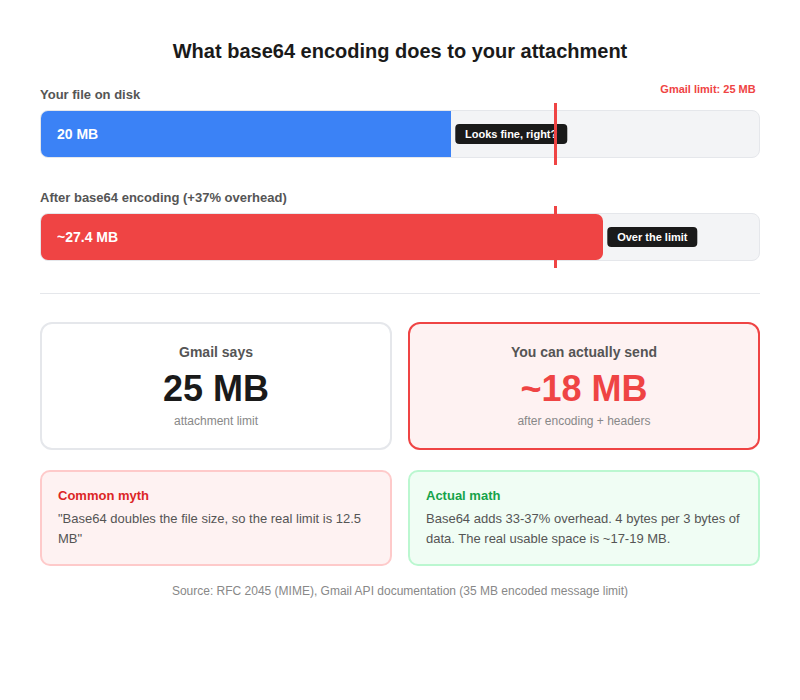
The real, safe limit is closer to 17 or 18 MB. Anything above that and you're rolling the dice.
And there's another catch. Even if Gmail lets you send the email, the person receiving it might have a tighter limit on their end. Outlook (the desktop version) defaults to 20 MB. A lot of company email servers only allow 10 or 15 MB. So your email leaves Gmail just fine but never arrives.
You might read elsewhere that email packaging doubles the file size, making the real limit 12.5 MB. That's not right. The overhead is about a third (33 to 37%), not double. Your actual usable space is around 17 to 18 MB.
What happens when your file is too big
When you try to attach something over 25 MB, Gmail doesn't just say no. It tries to help by sending your file through Google Drive instead. That sounds convenient, but it often creates more problems than it solves.
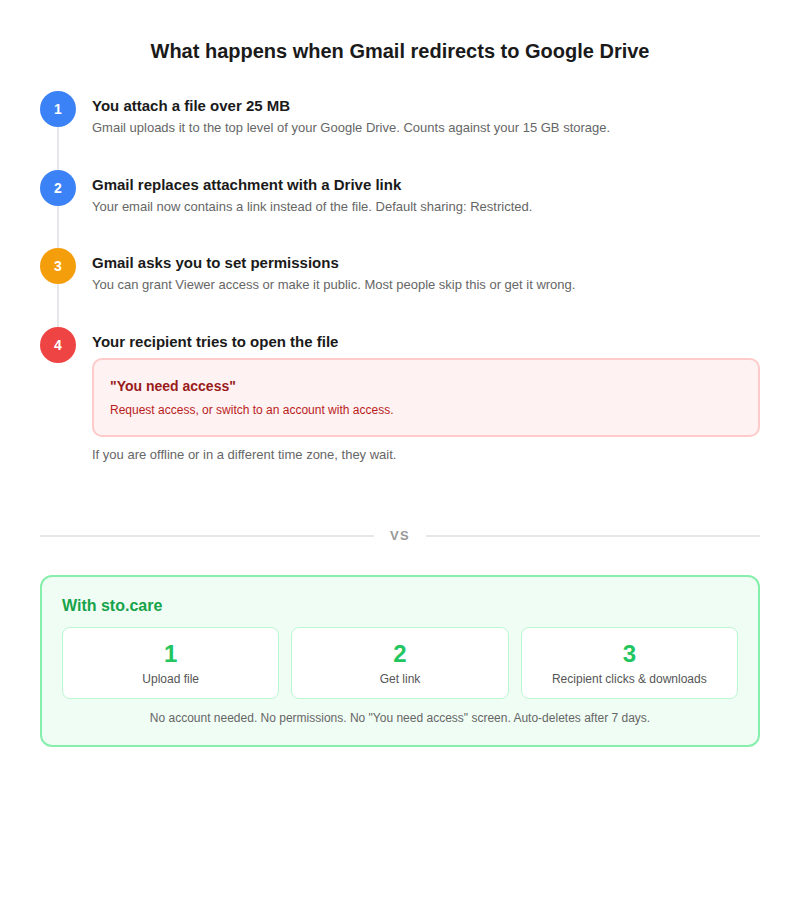
If you've ever received one of those “You need access” screens from someone who shared a Google Drive file, you know how frustrating it is. You click the link, and instead of your file, you get a wall asking you to request permission. If the person who sent it is busy, asleep, or in a different time zone, you just wait.
That's exactly what happens when Gmail redirects your attachment through Drive. And there are a few other issues:
- It eats your storage. Gmail, Google Drive, and Google Photos all share the same 15 GB of free space. Every big file that gets redirected to Drive takes up room you might need for other things.
- The files sit there forever. They don't disappear on their own. They stay in your Drive until you go in and delete them yourself.
- Google can see your files. Google Drive's terms say they may review your content. Your files are stored on their servers and Google holds the keys to them.
- The other person might need a Google account. If you don't set the sharing to “anyone with the link,” the recipient needs to be signed into Google to open it.
Didn't Google just raise the limit in 2026?
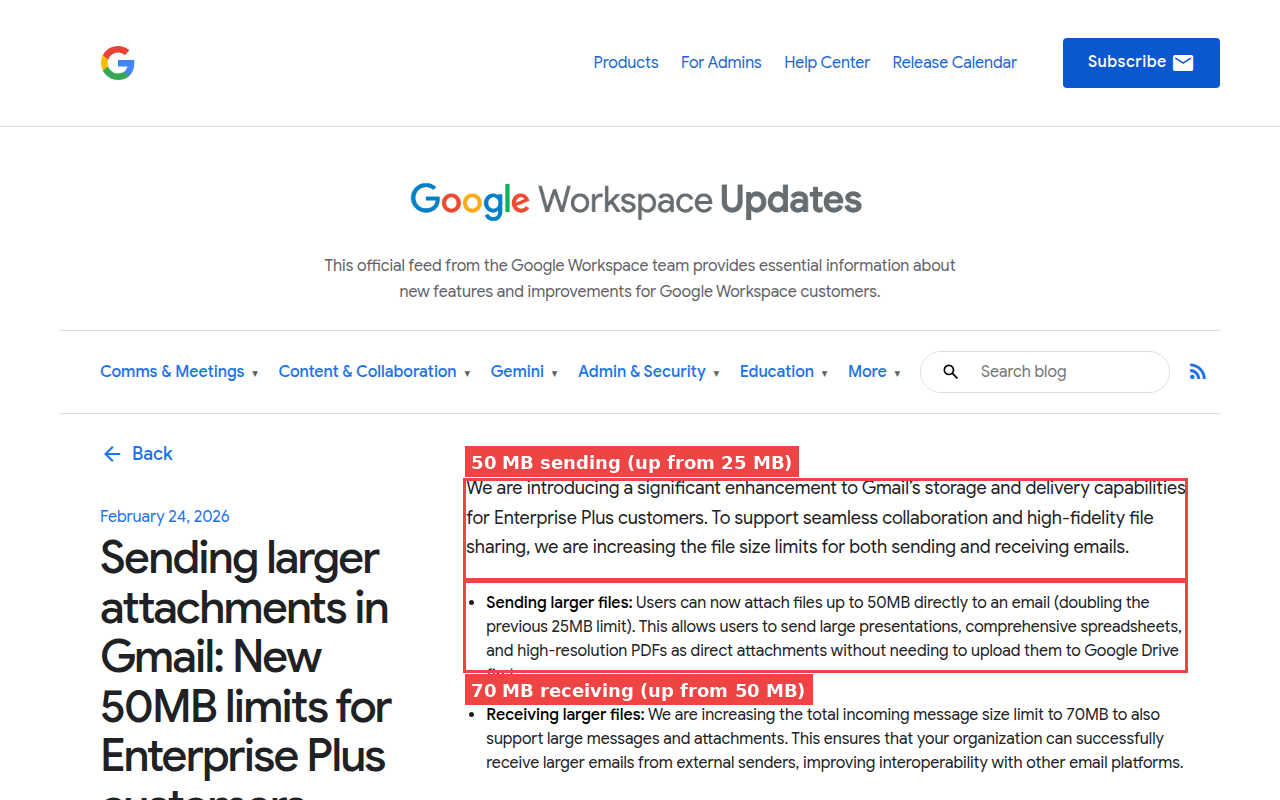
Yes, but only for one specific plan. In February 2026, Google doubled the limit for Enterprise Plus customers (50 MB sending, 70 MB receiving). That's their most expensive Workspace tier.
For everyone else? Nothing changed. Free Gmail, Workspace Starter, Standard, Business Plus: all still 25 MB. If you're reading this article, the new limit almost certainly doesn't apply to you.
Common files that are already too big for Gmail
You might think 25 MB is plenty. But think about the kinds of files people actually need to send:
| What you're sending | How big it is | Real-world example |
|---|---|---|
| A phone video | 100+ MB per minute | Even a 15-second clip can be 30 MB |
| High-quality photos | 20 to 65 MB each | One photo from a good camera is already too big |
| A PowerPoint with images | 30 to 200+ MB | Add a few high-res photos or a video clip and it balloons |
| Scanned documents | 10 to 500+ MB | A 20-page scan at decent quality can hit 50 MB |
| Audio recordings | About 10 MB per minute | A 4-minute recording is 40 to 45 MB |
| Design files (Photoshop, etc.) | 50 MB to several GB | Forget about emailing these |
This isn't some rare edge case. A single photo from a modern phone camera, a short video clip, a presentation with a few images in it: all of these can be too big for Gmail.
Can I just ZIP the file to make it smaller?
It depends on what kind of file it is. For Word documents, Excel spreadsheets, and plain text, yes. Zipping can shrink those by half or more.
But for the files that actually cause problems? Not really.
| File type | How much ZIP shrinks it | Bottom line |
|---|---|---|
| Word docs, Excel, text files | 50 to 90% smaller | Great. Do it. |
| Photos (JPEG, PNG) | 1 to 5% smaller | Barely makes a dent |
| Videos (MP4) and music (MP3) | 0 to 2% smaller | Completely pointless |
Videos, photos, and audio files are already compressed. You can't squeeze them down any further. Zipping a 100 MB video gives you a 99 MB ZIP file. It doesn't help.
It's not just Gmail. Every email service has this problem.
| Email service | Can send | Can receive | Good to know |
|---|---|---|---|
| Gmail (free) | 25 MB | 50 MB | Sends big files through Drive |
| Outlook.com | 25 MB | 25 MB | Tighter than Gmail on receiving |
| Outlook (desktop app) | 20 MB | 20 MB | This is why your email sometimes bounces |
| Yahoo Mail | 25 MB | 25 MB | Also slashed free storage in 2025 |
| Apple iCloud Mail | 20 MB | 20 MB | Has “Mail Drop” for files up to 5 GB |
| Microsoft 365 (business) | 35 MB | 35 MB | Higher, but IT admin controls it |
This is the part people don't think about. Even if your Gmail sends the email without complaining, the person on the other end might have a lower limit. Outlook desktop is only 20 MB. A lot of company email servers are set to 10 or 15 MB. Your message can leave Gmail successfully and still bounce at the other end.
Some files Gmail won't send at all (no matter the size)
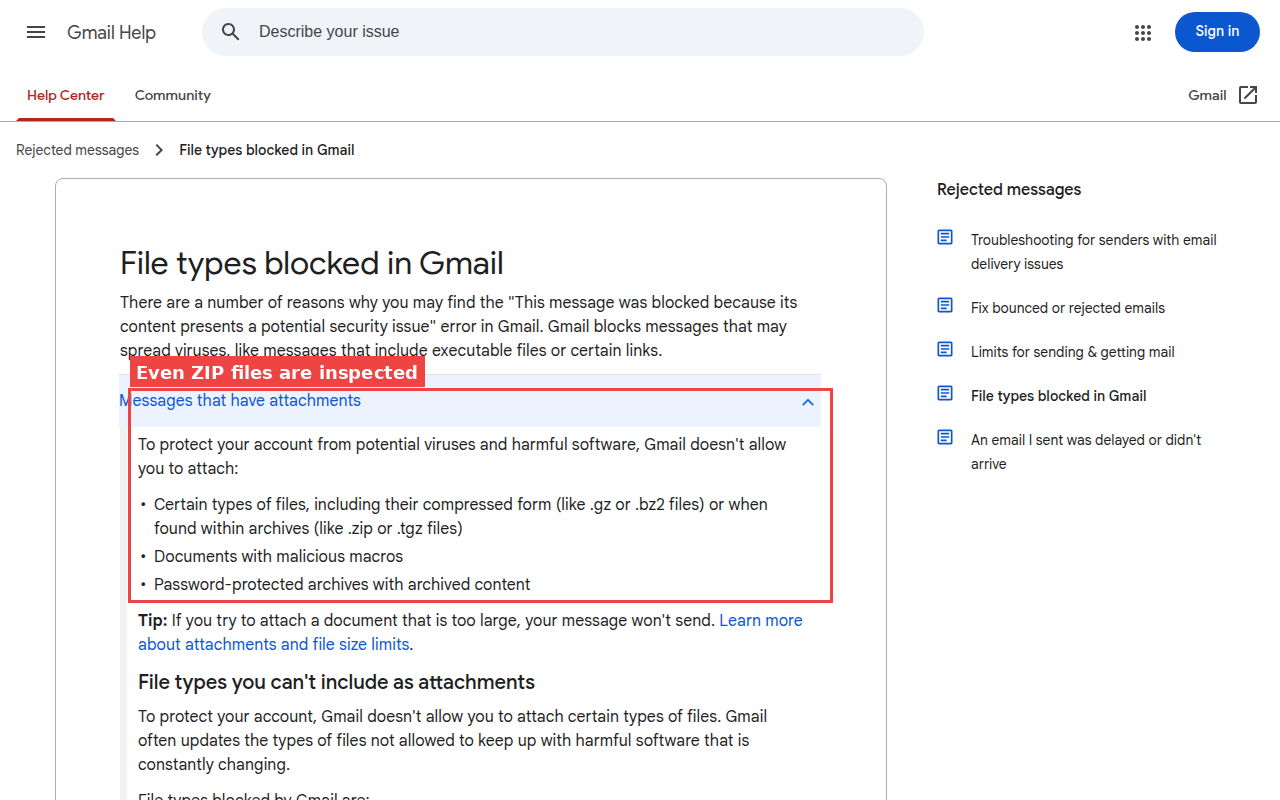
Gmail blocks certain file types for security reasons, regardless of size. These include program files (.exe), installer files (.msi), disk images (.iso, .dmg), and many others.
And don't try putting them inside a ZIP file. Gmail opens up ZIP files and checks what's inside. If it finds a blocked file type, the whole email gets rejected.
The easiest fix: send a download link instead
You don't have to fight with file sizes, compression, or Drive permissions. There's a much simpler approach: upload your file to a sharing service, grab the download link, and paste it into your email.
That's what sto.care does. You upload your file (up to 5 GB), and you get a link. Paste that link into your email, text message, WhatsApp, wherever. The other person clicks it and downloads the file. No account needed on either end. The file gets automatically deleted after 7 days.
No “You need access” screens. No eating into your Google storage. No files sitting in your Drive forever.
| Service | Free limit | Need an account? | Link lasts |
|---|---|---|---|
| sto.care | 5 GB | No | 7 days |
| WeTransfer | 3 GB | No | 3 days (max 10 per month) |
| SwissTransfer | 50 GB | No | Up to 30 days |
| Google Drive | 15 GB (shared with Gmail) | Yes | Stays until you delete it |
We put together a full comparison of 22 file sharing services if you want to see all your options side by side.
Frequently asked questions
What is the Gmail attachment size limit?
25 MB for free Gmail and most paid Workspace plans. Google raised it to 50 MB for Enterprise Plus customers in February 2026, but that's their most expensive plan. The limit covers all attachments in the email combined, not per file.
Is the limit per file or per email?
Per email. If you attach three files that add up to more than 25 MB, the email won't send. Even if each file is small on its own.
Why does my 20 MB file fail to send?
Email has to repackage your file before sending it, and that adds about a third to the size. A 20 MB file becomes roughly 27 MB after repackaging. On top of that, the person receiving it might have an even tighter limit (Outlook desktop is 20 MB, and many company servers cap at 10 to 15 MB).
Can I increase the limit?
Not on personal Gmail. There's no setting for it. If your company uses Google Workspace, the IT team can adjust it, but the ceiling is still 25 MB for most plans.
What happens when I send a file over 25 MB?
Gmail uploads your file to Google Drive and puts a link in the email instead. The problem is the other person often sees “You need access” and can't open the file until you fix the permissions.
Did Google raise the limit in 2026?
Only for Enterprise Plus, their most expensive business plan. It went from 25 MB to 50 MB for sending, and 50 MB to 70 MB for receiving. Everyone else stays at 25 MB.
What file types does Gmail block?
Program files (.exe), installer files (.msi), disk images (.iso, .dmg), and many others. Gmail checks inside ZIP files too, so putting a blocked file in a ZIP doesn't help.
How do I send large files without Google Drive?
Upload your file to a sharing service like sto.care and paste the download link into your email. It handles files up to 5 GB, no account needed. The person you're sending to just clicks the link and downloads. We wrote a guide covering 22 different services if you want to compare your options.
Do attachments count toward my Google storage?
Yes. Gmail, Google Drive, and Google Photos all share the same 15 GB of free storage. Every email with attachments counts toward that. If Gmail redirects a big file to Drive, it takes up Drive space too.