Send Large Files to Clients Without Looking Unprofessional
The email bounced. The Dropbox link asked your client to make an account. The WeTransfer link expired over the weekend. You sent the preview on WhatsApp and your client thinks the blurry, compressed version is your actual work.
If you're a photographer, videographer, or designer, you've been through at least one of these. The frustrating part is that you did great work. The delivery is what made you look amateur.
What your client actually experiences
You spent hours on the shoot. You spent more hours editing. Then you picked a random way to send the files and your client hit a wall. Here's what that looks like from their side:
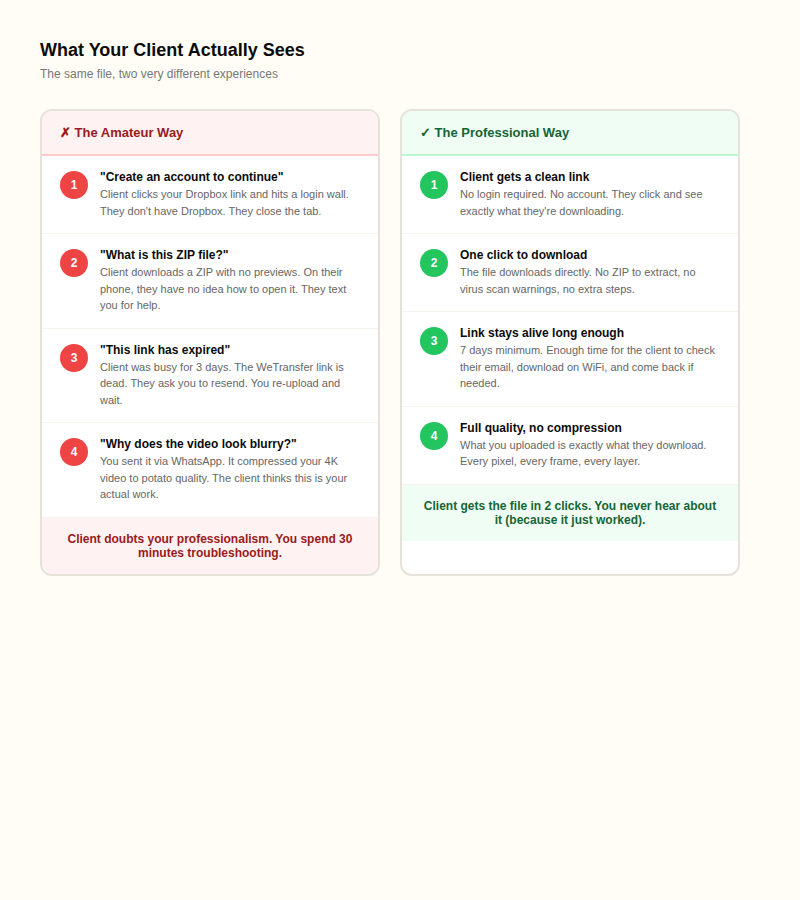
Your client doesn't care which service you used. They care that the download worked on the first try, on their phone, without creating an account, without calling you for help.
How big are creative files, really?
Most people outside the creative industry have no idea how big professional files actually are. Here's a reference:
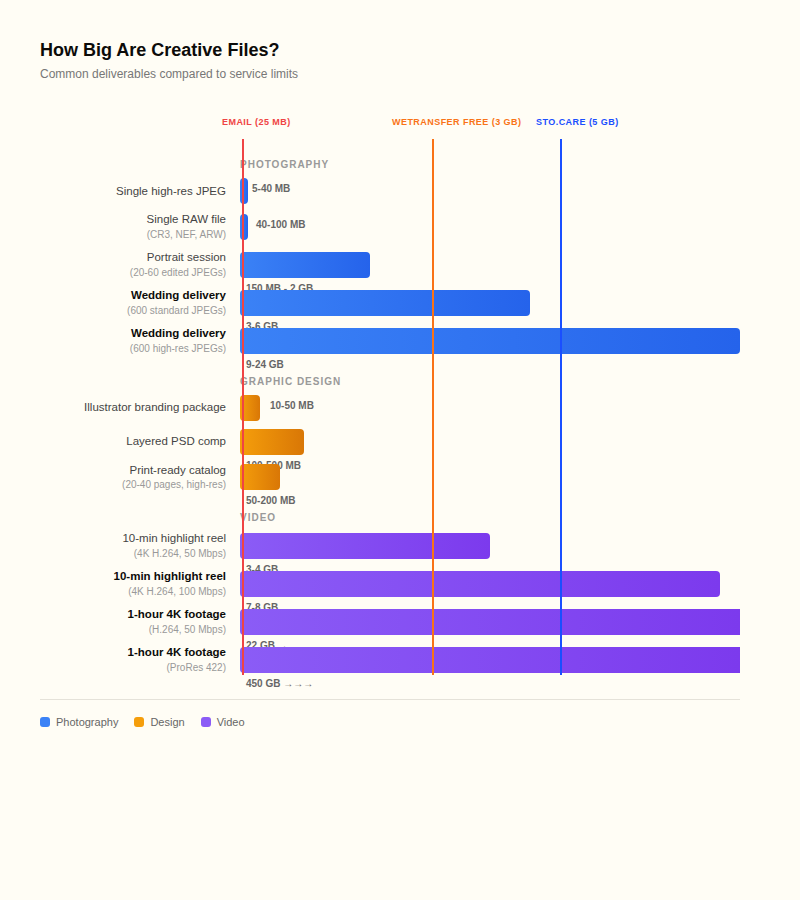
A single RAW photo is 40-100 MB. You can't email it. A standard wedding delivery of 600 edited JPEGs runs 3-6 GB. A 10-minute 4K highlight reel is 3-8 GB depending on the bitrate. Even a layered Photoshop comp for a branding project can hit 500 MB.
Email tops out at 25 MB (and the real limit is closer to 18 MB after encoding). WhatsApp crushes everything. Most free services cap at 2-3 GB. Once you know the actual numbers, it's obvious why creative professionals keep running into walls.
WhatsApp and iMessage destroy your work
This one hurts because it's so tempting. The client is right there in the chat. You drag the photo in and hit send. Done?
Not done. WhatsApp compresses images to roughly 800x600 pixels, regardless of the original resolution. A 12-megapixel photo from your camera becomes a thumbnail. One documented case showed a 94% reduction in file size. Your client sees a muddy, blocky version and thinks that's what they paid for.
iMessage is better between Apple devices (up to 100 MB), but if the recipient is on Android, it falls back to MMS with a 3.5 MB cap. Your high-res photos become unrecognizable.
The workaround for WhatsApp is to send files as a "document" attachment instead of a photo, which skips the compression. But most clients don't know this, and for anything over a few hundred MB it's still not practical.
WeTransfer's free tier doesn't work for serious deliveries
WeTransfer used to be the go-to for creatives. That changed. The free tier now gives you 3 GB per transfer, 10 transfers per month, and a 3-day link expiry.
Run the numbers. A standard wedding JPEG delivery is 3-6 GB. The free tier can't handle half of them. A 10-minute 4K highlight reel at professional bitrate is 5-8 GB. Forget it.
The 3-day expiry is the real killer. You send the link Friday afternoon. Your client has a busy weekend. Monday morning, the link is dead. They email you asking for the files again. You re-upload, wait, resend. It's unprofessional and it wastes your time. TechCrunch called expiry dates "a major pain point for users, especially creatives."
The Dropbox login wall
Dropbox is solid storage, but sharing files with non-Dropbox users is a mess. If you share a folder (instead of a link), your client gets a prompt to create a Dropbox account before they can access anything. Many photographers use shared folders by default and don't realize their clients are hitting this wall.
The fix is to use share links, not folder invitations. Share links let anyone download without logging in. But even then, Dropbox shows files as a plain file list with no gallery view, which isn't a great experience for delivering photography.
The 4K video problem
Video makes everything harder. Here's what one minute of 4K footage looks like depending on the codec:
- H.264 at 50 Mbps: about 375 MB per minute
- H.264 at 100 Mbps: about 750 MB per minute
- H.265/HEVC at 25 Mbps: about 187 MB per minute (half the size of H.264 at similar quality)
- ProRes 422: about 7.5 GB per minute
A 10-minute wedding highlight in H.264 is roughly 4-8 GB. A full ceremony edit can easily be 20-50 GB. Raw footage in ProRes is measured in hundreds of gigabytes.
Watch the codec. Windows doesn't natively play ProRes files. H.265 requires a paid codec extension on Windows 10/11. Unless your client is an editor who specifically needs ProRes, deliver in H.264 (MP4 container) for maximum compatibility. It plays everywhere: phones, laptops, tablets, smart TVs.
What to use based on what you're sending
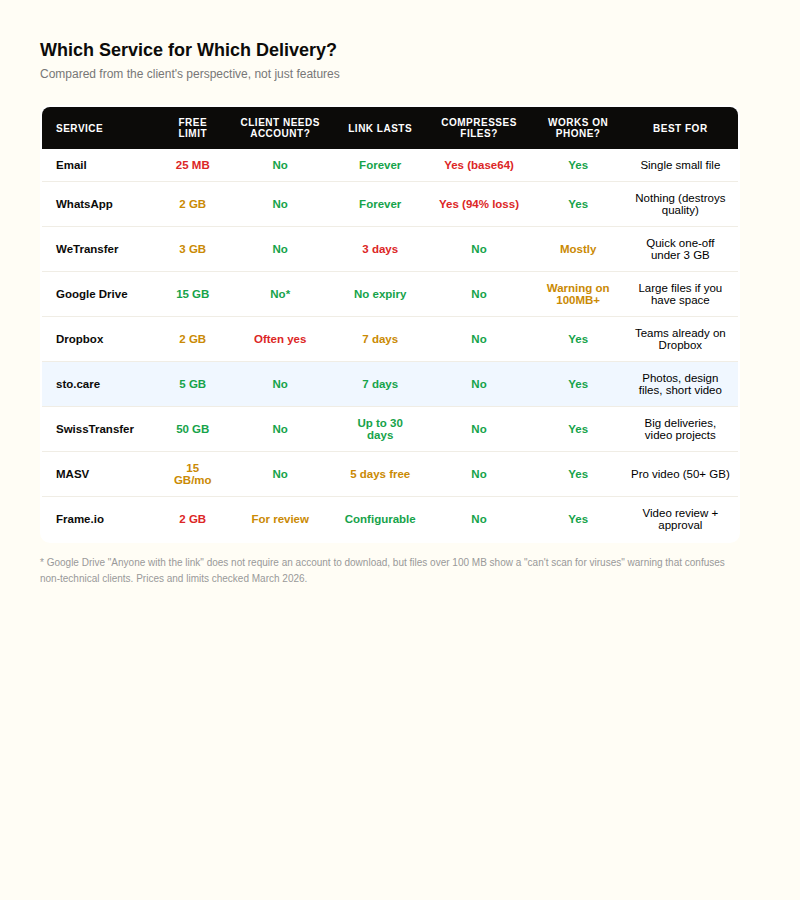
Here's the practical breakdown by file size:
Under 5 GB (most photo and design deliveries)
sto.care handles up to 5 GB with no account required on either end. Your client gets a link, clicks it, and downloads. Files stay available for 7 days. No ads, no compression, works on phone. This covers portrait sessions, branding packages, print-ready catalogs, short videos, and most standard wedding JPEG deliveries.
SwissTransfer is another strong option with a 50 GB free limit, though links max out at 250 downloads.
5-50 GB (high-res weddings, video projects)
SwissTransfer covers up to 50 GB for free. Google Drive works if you have the storage (15 GB free). For sto.care, contact support if you need to deliver something over 5 GB and we can work something out.
50+ GB (raw footage, multi-day shoots)
MASV is built for this. Pay-as-you-go at $0.25 per GB with no file size limit and resumable downloads (critical for huge files on unreliable connections). Frame.io ($15/user/month) is better if you also need review and approval tools.
Five things that make delivery look professional
Before you send anything to a client, check these five things:
- No login required for the recipient. Your client should never see an account creation form. If the service asks them to sign up, use a different service.
- No compression. What you uploaded should be exactly what they download. Test this yourself: upload a file, download it from the link, compare file sizes.
- At least 7 days before the link expires. Three days isn't enough. People are busy. A week gives them room to download when it'sconvenient.
- Works on their phone. Many clients will open your link on their phone first. If the file is a ZIP that their phone can't handle, or a codec their phone doesn't support, that's your problem to solve before sending.
- One file, not a ZIP of 47 things. If you're sending a single deliverable (a video, a PSD, a PDF), send it as a single file. ZIPs are only worth the hassle if you're sending a batch of photos that the client specifically needs as separate files.
FAQ
How do I send large photos to a client?
Upload them to a service that doesn't require your client to create an account. sto.care handles up to 5 GB and SwissTransfer goes up to 50 GB. Never send photos via WhatsApp or iMessage unless you send them as a document attachment (not a photo), because both compress images heavily.
What is the best way to send a 4K video to a client?
For videos under 5 GB, sto.care or SwissTransfer work well. For larger files, MASV ($0.25/GB) is the go-to for video professionals. Always deliver in H.264 codec unless the client specifically asks for something else. ProRes and H.265 cause playback issues on Windows.
Does WhatsApp compress photos?
Yes. WhatsApp resizes photos to roughly 800x600 regardless of the original resolution, reducing file size by up to 94%. A 12-megapixel photo becomes a low-quality thumbnail. Send files as a "document" attachment to skip the compression, or use a proper file sharing service.
Why does Dropbox ask my client to create an account?
Dropbox folder invitations require an account. Share links don't. If your clients are complaining about login prompts, you're probably sharing folders instead of links. Switch to share links, or use a service that never requires accounts like sto.care.
What happens when a WeTransfer link expires?
On the free tier, links expire after 3 days and files are permanently deleted. There is no recovery option. You have to re-upload and send a new link. Paid plans ($7-25/month) extend the expiry to 7-30 days.
How big is a wedding photo delivery?
A standard delivery of 600 edited JPEGs runs 3-6 GB. High-resolution versions push that to 9-24 GB. If the client wants RAW files, expect 30-60 GB. Most free services top out well below what a full wedding delivery requires.
Can my client play a ProRes video file?
Probably not if they're on Windows. ProRes isn't natively supported. They will need VLC or the Apple ProRes codec. For client delivery, export in H.264 (MP4). It plays on everything. Send ProRes only if the client is an editor who specifically requests it.
How do I send files larger than 5 GB?
SwissTransfer handles up to 50 GB for free. MASV has no size limit at $0.25/GB. Google Drive works if you have the storage space. For sto.care, contact support if you need to send something over the standard 5 GB limit.