Slack File Size Limit in 2026: 1 GB Per File, But...
Slack lets you upload files up to 1 GB. That sounds generous, and compared to most chat platforms, it is. Discord caps free users at 10 MB. Google Chat stops at 200 MB.
But the 1 GB number isn't what catches people off guard. It's the other limits: free workspaces only get 5 GB of total storage, files older than 90 days quietly disappear from view, and after a year, Slack permanently deletes them. No warning, no recovery.
If you've been wondering why that file from a few months ago says it's "not available," this is why.
What are Slack's actual file and storage limits?
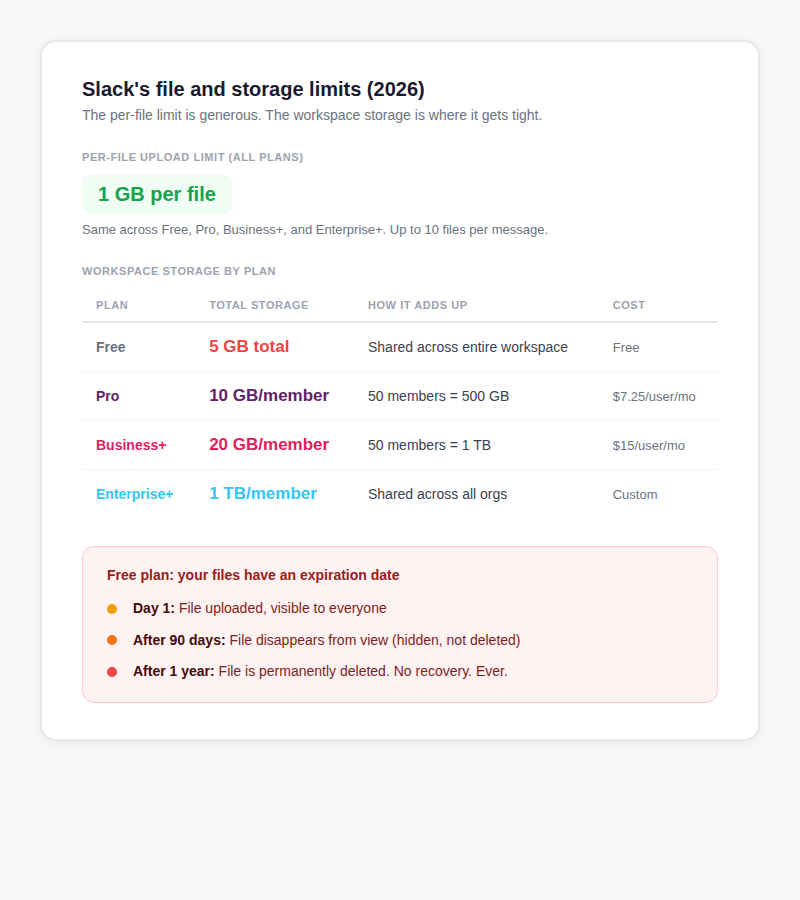
The 1 GB per-file limit applies to every plan, from Free all the way up to Enterprise+. There's no way to raise it. You can attach up to 10 files per message, and the limit applies to each file individually (not the total).
Where things get complicated is workspace storage. On the free plan, your entire team shares 5 GB total. A team of 5 people gets 1 GB each in practice. Upload a few Zoom recordings and you're done.
Paid plans pool storage across all members. A 50-person team on Pro gets 500 GB total (10 GB times 50). Business+ doubles that to 20 GB per member. Enterprise+ gives 1 TB per member.
The 90-day and 1-year rules are new. Since September 2024, files on free workspaces become hidden after 90 days and are permanently deleted after 1 year. This is a rolling deletion, not a one-time event. If you upgrade to a paid plan, hidden files come back, but anything already deleted is gone forever.
What happens when your Slack workspace runs out of storage?
On paid plans, Slack doesn't block new uploads. Instead, it archives older files to make room. Archived files show up as hidden in your conversations but aren't deleted. Your admin gets a notification. Deleting old files or upgrading to a higher plan brings the hidden ones back.
On the free plan, it's harsher. When you hit 5 GB, new uploads can fail entirely until someone deletes old files. And here's the painful part: Slack only lets you delete files one at a time. There's no "select all" or bulk delete. If your team has been sharing screenshots and documents for months, cleaning up means clicking through files individually.
Text messages aren't affected. You can keep sending messages even when file storage is completely maxed out. Only uploaded files count toward the storage limit.
What files are too big for Slack?
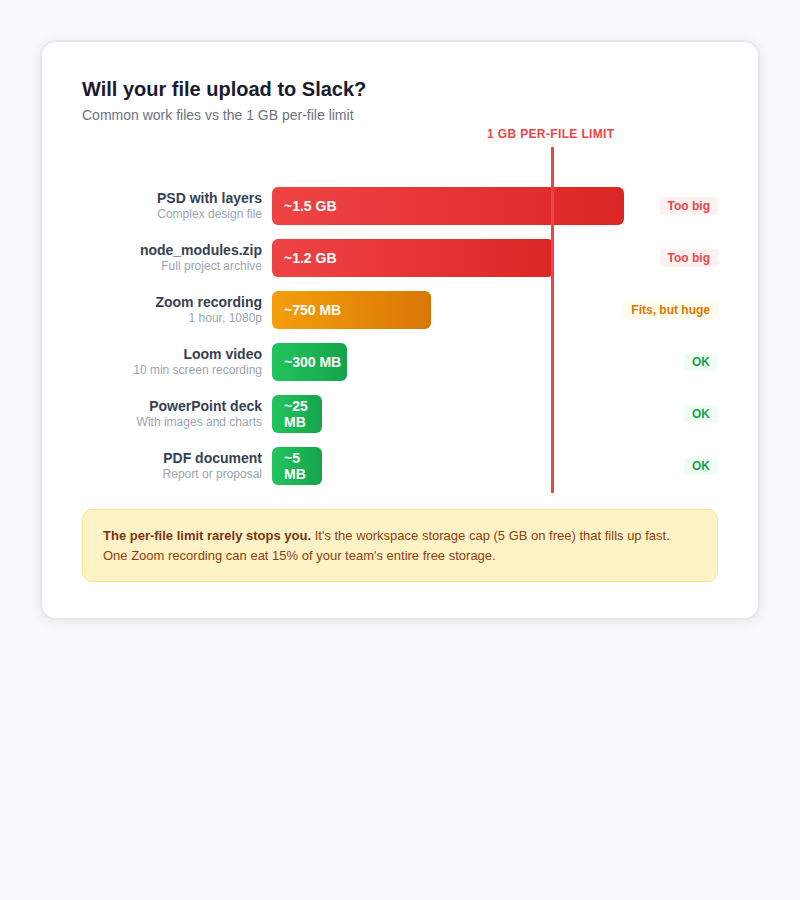
For everyday documents, the 1 GB limit isn't a problem. PDFs, spreadsheets, and slide decks rarely come close. Where people actually get stuck:
- Zoom recordings at 1080p run 230 to 750+ MB per hour. Longer meetings or higher resolutions can push past 1 GB.
- Photoshop files with lots of layers regularly hit 1 to 2 GB. Complex Illustrator files can reach 500 MB+.
- Code project archives (especially with dependencies) can easily be 500 MB to 2 GB.
Even when a file fits under 1 GB, it still eats into your workspace storage. One hour-long Zoom recording can use 15% of your free plan's entire allocation.
How does Slack's file limit compare to other platforms?
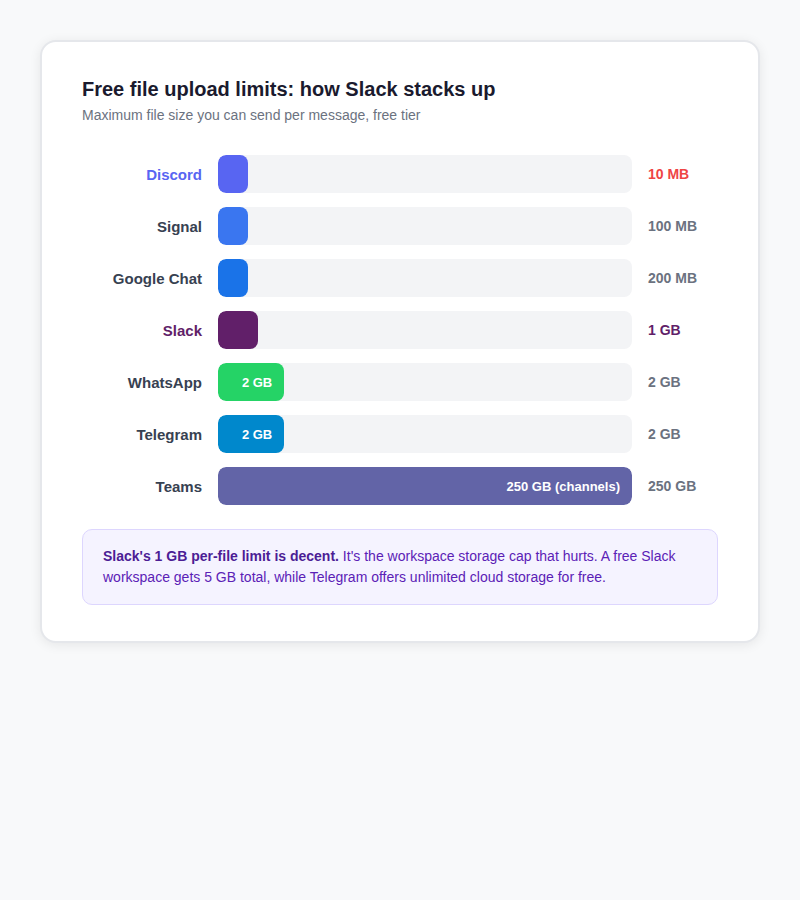
On per-file limits alone, Slack is in the middle of the pack. Better than Discord (10 MB) and Google Chat (200 MB), but behind Telegram (2 GB) and Teams (250 GB for channel uploads).
The real difference is total storage. Telegram offers unlimited cloud storage for free. Teams gives organizations 1 TB as a baseline plus 10 GB per license. Slack's free plan gives you 5 GB total, and that number hasn't changed.
How to share large files on Slack without hitting the limit
Use a cloud storage integration
This is the best option if your team already uses Google Drive, OneDrive, Dropbox, or Box. Slack has official integrations for all of them. Share a file from Drive, and it shows up in Slack with a rich preview. Cloud-linked files don't count toward your Slack storage, which is the real win.
Google Drive even handles permissions automatically. If you share a restricted file, Slack prompts you to grant access right there in the conversation.
Upload somewhere and paste the link
For one-off file shares, especially with people outside your workspace, you don't need a full cloud storage setup. Upload the file to a sharing service, copy the link, paste it in Slack.
- sto.care handles files up to 5 GB. No account, no app to install. Upload, get a link, paste it. Files auto-delete after 7 days. We built it, so we're biased, but it works well for quick shares that don't need to live forever.
- WeTransfer handles up to 2 GB on the free tier with a 7-day expiry. Good option, though they now cap free users at 10 transfers per month.
- SwissTransfer goes up to 50 GB per transfer with a 30-day window. If you're sending a massive video file, this is the most generous free option.
For more options, see our guide to sending large files for free.
Compress video before uploading
If a Zoom recording is slightly over 1 GB, HandBrake (free) can bring it down. Set the output to H.264 in an MP4 container, lower the resolution to 720p, and use RF 24 to 28. A 1.2 GB recording can often shrink to 400 to 600 MB without losing much visible quality.
Clean up old files
If your workspace is near the storage cap, you'll need to delete old files. Slack's built-in option is painfully slow since you can only delete one file at a time. Third-party tools like Flack ($7-10/month) offer bulk deletion. There are also free open-source scripts on GitHub that use the Slack API, though Slack's recent rate limits (15 operations per minute for non-Marketplace apps) make them slow.
How much does Slack cost in 2026?
| Plan | Monthly cost (annual billing) | Storage per member | Worth it for storage? |
|---|---|---|---|
| Free | $0 | 5 GB total (shared) | You'll hit this fast with any media |
| Pro | $7.25/user | 10 GB/member | Reasonable if you need other Pro features |
| Business+ | $15/user | 20 GB/member | Expensive. You're paying for AI and compliance too |
| Enterprise+ | Custom | 1 TB/member | Only makes sense at 250+ seats |
Quick math: if your 10-person team upgrades from Free to Pro just for more storage, that's $72.50 per month ($870/year). Pro does include other useful features like unlimited message history, group huddles, and AI summaries. But if file sharing is your only pain point, using a cloud storage integration or a free file sharing service costs nothing.
Slack raised Business+ pricing from $12.50 to $15/user/month in June 2025 when they bundled AI features into the plan. If you don't need the AI, SSO, or compliance tools, Pro gives you double the free plan's storage at less than half the per-user cost.
Frequently asked questions
What is Slack's file size limit?
1 GB per file, on every plan. You can attach up to 10 files per message. This is the same on desktop, mobile, and web.
How much storage does Slack's free plan have?
5 GB total, shared across the whole workspace. Files older than 90 days become hidden, and files older than one year are permanently deleted. This started in September 2024.
What happens when Slack storage is full?
On paid plans, older files get archived to make room but aren't deleted. On the free plan, uploads can fail until you delete old files. Text messages aren't affected either way.
Can you increase Slack's file upload limit?
No. The 1 GB per-file cap is fixed on every plan. You can get more total workspace storage by upgrading (Pro gives 10 GB per member), but the per-file limit stays the same.
How to share files larger than 1 GB on Slack?
Upload to Google Drive, OneDrive, or a sharing service like sto.care, then paste the link in Slack. The file stays in the external service and doesn't count against your workspace storage.
Does Slack delete old files?
On the free plan, yes. Files become hidden after 90 days and permanently deleted after one year. Paid plans keep files indefinitely unless your admin sets a custom retention policy.
Do Google Drive files shared in Slack count toward storage?
No. Files shared via Google Drive, OneDrive, Dropbox, or Box show a preview in Slack but remain stored in their original service. They don't use any of your Slack workspace storage.
How much does Slack cost in 2026?
Free plan is $0 with 5 GB storage. Pro is $7.25/user/month (annual). Business+ is $15/user/month. Enterprise+ is custom pricing. Slack raised Business+ prices in June 2025 when they added AI features to the plan.